Hystrix 1.5 滑动窗口实现原理总结
总览
Netflix Hystrix 通过类似滑动窗口的数据结构来统计调用的指标数据。Hystrix 1.5 将滑动窗口设计成了数据流(reactive stream, RxJava 中的 Observable)的形式。通过消费数据流的形式利用滑动窗口,并对数据流进行变换后进行后续的操作,可以让开发者更加灵活地去使用。由于 Hystrix 里大量使用了 RxJava,再加上滑动窗口本质就是不断变换的数据流,滑动窗口中每个桶的数据都来自于源源不断的事件,因此滑动窗口非常适合用观察者模式和响应式编程思想的 RxJava 实现。使用 RxJava 实现有一大好处:可以通过 RxJava 的一系列操作符来实现滑动窗口,从而可以依赖 RxJava 的线程模型来保证数据写入和聚合的线程安全,将这一系列的机制交给 RxJava。所有的操作都是在 RxJava 的后台线程上进行的,RxJava 会保证操作的有序性和线程安全(参见 The Observable Contract)。
这里我们就以 Hystrix 熔断器依赖的记录调用情况统计的 HealthCountsStream 为例来看一下 Hystrix 1.5 是如何利用 RxJava 将滑动窗口抽象并实现成 reactive stream 的,以及如何去消费对应的数据流。
滑动窗口的实现都位于 com.netflix.hystrix.metric.consumer 包下,这里只挑 BucketedRollingCounterStream 这条线的实现来分析。首先先看一下类的继承结构:

最顶层的 BucketedCounterStream 抽象类提供了基本的桶计数器实现,按配置的时间间隔将所有事件聚合成桶;BucketedRollingCounterStream 抽象类在其基础上实现滑动窗口,并聚合成指标数据;而最底下一层的类则是各种具体的实现,比如 HealthCountsStream 最终会聚合成健康检查数据(HystrixCommandMetrics.HealthCounts,统计调用成功和失败的计数),供 HystrixCircuitBreaker使用。
BucketedCounterStream
总览
BucketedCounterStream 抽象类提供了基本的桶计数器实现。用户在使用 Hystrix 的时候一般都要配两个值:timeInMilliseconds 和 numBuckets,前者代表滑动窗口的长度(时间间隔),后者代表滑动窗口中桶的个数,那么每个桶对应的窗口长度就是 bucketSizeInMs = timeInMilliseconds / numBuckets(记为一个单元窗口周期)。BucketedCounterStream 每隔一个单元窗口周期(bucketSizeInMs)就把这段时间内的所有调用事件聚合到一个桶内。我们来看一下它的实现,首先来看一下它的泛型定义:
|
1 2 3 |
public abstract class BucketedCounterStream<Event extends HystrixEvent, Bucket, Output> { // ... } |
BucketedCounterStream 的泛型里接受三个类型参数,其中第一个 Event 类型代表 Hystrix 中的调用事件,如命令开始执行、命令执行完成等。这种事件驱动的设计也非常符合 RxJava 的思想,每个调用者都向订阅者发布事件,订阅者将事件聚合成调用指标;第二个 Bucket 类型代表桶的类型,第三个 Output 类型代表数据聚合的最终输出类型。
BucketedCounterStream 核心代码在构造函数里(为了可读性起见,将所有可以用 lambda expression 的地方都转换成了 lambda expression,下同):
|
1 2 3 4 5 6 7 8 9 10 11 12 13 14 15 16 17 18 19 20 21 22 23 |
protected final int numBuckets; protected final Observable<Bucket> bucketedStream; private final Func1<Observable<Event>, Observable<Bucket>> reduceBucketToSummary; protected BucketedCounterStream(final HystrixEventStream<Event> inputEventStream, final int numBuckets, final int bucketSizeInMs, final Func2<Bucket, Event, Bucket> appendRawEventToBucket) { this.numBuckets = numBuckets; this.reduceBucketToSummary = eventBucket -> eventBucket.reduce(getEmptyBucketSummary(), appendRawEventToBucket); final List<Bucket> emptyEventCountsToStart = new ArrayList<>(); for (int i = 0; i < numBuckets; i++) { emptyEventCountsToStart.add(getEmptyBucketSummary()); } this.bucketedStream = Observable.defer(() -> { return inputEventStream .observe() .window(bucketSizeInMs, TimeUnit.MILLISECONDS) //bucket it by the counter window so we can emit to the next operator in time chunks, not on every OnNext .flatMap(reduceBucketToSummary) //for a given bucket, turn it into a long array containing counts of event types .startWith(emptyEventCountsToStart); //start it with empty arrays to make consumer logic as generic as possible (windows are always full) }); } |
其中 bucketedStream 即为本次得到的数据流(类型为 RxJava 中的 Observable,即观察者模式中的 Publisher,会源源不断地产生事件/数据),里面最核心的逻辑就是如何将一个一个的事件按一段时间聚合成一个桶。我们可以看到 bucketedStream 是经事件源 inputEventStream 变换而成的,事件源的类型为 HystrixEventStream<Event>,它代表事件流接口:
|
1 2 3 4 |
public interface HystrixEventStream<E extends HystrixEvent> { Observable<E> observe(); } |
其中 observe 方法返回这个事件流对应的发布者 Observable,订阅者可以对事件进行变换并消费。
事件流的写入
Hystrix 中执行函数以命令模式封装成了一个一个命令(Command),每个命令执行时都会触发某个事件,其中命令执行完成事件(HystrixCommandCompletion)是 Hystrix 中最核心的事件,它可以代表某个命令执行成功、超时、异常等等的各种的状态,与服务调用的熔断息息相关。熔断器的计数依赖于 HystrixCommandCompletion 事件,因此这里我们只关注这个事件对应的事件流,其余类型的事件流原理类似。
那么这个事件流中的事件是从哪里发布的呢?我们来看一下相关的具体实现 - HystrixCommandCompletionStream(仅核心代码):
|
1 2 3 4 5 6 7 8 9 10 11 12 13 14 15 16 17 18 19 20 21 22 23 24 25 26 27 28 29 30 31 32 33 |
public class HystrixCommandCompletionStream implements HystrixEventStream<HystrixCommandCompletion> { private final HystrixCommandKey commandKey; private final Subject<HystrixCommandCompletion, HystrixCommandCompletion> writeOnlySubject; private final Observable<HystrixCommandCompletion> readOnlyStream; private static final ConcurrentMap<String, HystrixCommandCompletionStream> streams = new ConcurrentHashMap<String, HystrixCommandCompletionStream>(); public static HystrixCommandCompletionStream getInstance(HystrixCommandKey commandKey) { // 此段代码略,大致逻辑为:若对应的 CommandKey 的事件流已创建就从缓存中取出,否则就新创建并缓存起来,保证每个 CommandKey 只有一个实例 } HystrixCommandCompletionStream(final HystrixCommandKey commandKey) { this.commandKey = commandKey; this.writeOnlySubject = new SerializedSubject<HystrixCommandCompletion, HystrixCommandCompletion>(PublishSubject.<HystrixCommandCompletion>create()); this.readOnlyStream = writeOnlySubject.share(); } public static void reset() { streams.clear(); } public void write(HystrixCommandCompletion event) { writeOnlySubject.onNext(event); } @Override public Observable<HystrixCommandCompletion> observe() { return readOnlyStream; } } |
从代码里我们可以看到 write 方法里通过向某个 Subject 发布事件来实现了发布的逻辑,那么 Subject 又是什么呢?简单来说,Subject 就像是一个桥梁,既可以作为发布者 Observable,又可以作为订阅者 Observer。它可以作为发布者和订阅者之间的一个“代理”,提供额外的功能(如流量控制、缓存等)。这里的 writeOnlySubject是经过 SerializedSubject 封装的 PublishSubject。PublishSubject 可以看做 hot observable。为了保证调用的顺序(根据 The Observable Contract,每个事件的产生需要满足顺序上的偏序关系,即使是在不同线程产生),需要用 SerializedSubject 封装一层来保证事件真正地串行地产生。这里还有一个问题,就是不同的发布者调用 write 方法发布事件时,线程上下文可能都不同,那么如何保证其线程安全呢?Hystrix 1.5 通过使用 ThreadLocal 来保证每个线程都有一份 Subject 的实例,确保事件发布的线程安全。相关代码位于 HystrixThreadEventStream 内(已略去其它事件的代码):
|
1 2 3 4 5 6 7 8 9 10 11 12 13 14 15 16 17 18 19 20 21 22 23 24 25 26 27 28 29 30 31 32 33 34 35 36 37 38 39 40 41 42 43 44 45 46 47 48 49 50 51 52 |
public class HystrixThreadEventStream { private final long threadId; private final String threadName; private final Subject<HystrixCommandExecutionStarted, HystrixCommandExecutionStarted> writeOnlyCommandStartSubject; private final Subject<HystrixCommandCompletion, HystrixCommandCompletion> writeOnlyCommandCompletionSubject; private final Subject<HystrixCollapserEvent, HystrixCollapserEvent> writeOnlyCollapserSubject; private static final ThreadLocal<HystrixThreadEventStream> threadLocalStreams = new ThreadLocal<HystrixThreadEventStream>() { @Override protected HystrixThreadEventStream initialValue() { return new HystrixThreadEventStream(Thread.currentThread()); } }; private static final Action1<HystrixCommandCompletion> writeCommandCompletionsToShardedStreams = commandCompletion -> { HystrixCommandCompletionStream commandStream = HystrixCommandCompletionStream.getInstance(commandCompletion.getCommandKey()); commandStream.write(commandCompletion); if (commandCompletion.isExecutedInThread() || commandCompletion.isResponseThreadPoolRejected()) { HystrixThreadPoolCompletionStream threadPoolStream = HystrixThreadPoolCompletionStream.getInstance(commandCompletion.getThreadPoolKey()); threadPoolStream.write(commandCompletion); } }; /* package */ HystrixThreadEventStream(Thread thread) { this.threadId = thread.getId(); this.threadName = thread.getName(); writeOnlyCommandCompletionSubject = PublishSubject.create(); writeOnlyCommandCompletionSubject .onBackpressureBuffer() .doOnNext(writeCommandCompletionsToShardedStreams) .unsafeSubscribe(Subscribers.empty()); } public static HystrixThreadEventStream getInstance() { return threadLocalStreams.get(); } public void shutdown() { writeOnlyCommandStartSubject.onCompleted(); writeOnlyCommandCompletionSubject.onCompleted(); writeOnlyCollapserSubject.onCompleted(); } // 执行完毕/异常/超时都会调用此方法 public void executionDone(ExecutionResult executionResult, HystrixCommandKey commandKey, HystrixThreadPoolKey threadPoolKey) { HystrixCommandCompletion event = HystrixCommandCompletion.from(executionResult, commandKey, threadPoolKey); writeOnlyCommandCompletionSubject.onNext(event); } } |
这里 Hystrix 通过 ThreadLocal 为每个不同的线程都创建了不同的 HystrixThreadEventStream,里面的 Subject 都是 write-only, thread-safe 的。Hystrix 在这里额外加了一层 writeOnlyCommandCompletionSubject,提供额外的流量控制机制(onBackpressureBuffer),消费者太慢时这里会积压。其中会调用 HystrixCommandCompletionStream 的 write 方法产生对应的事件。
executionDone 方法最后会经 HystrixCommandMetrics 类的 markCommandDone 方法进行调用。HystrixCommandMetrics 是 Hystrix 中另一个重要的类,从中可以获取各种指标数据的流的实例。最后 Hystrix 会在对应命令执行完毕后,调用 markCommandDone 进行数据记录,并发布对应的事件。相关代码位于 AbstractCommand 类内:
|
1 2 3 4 5 6 7 8 9 10 11 12 13 14 15 16 17 18 |
private void handleCommandEnd(boolean commandExecutionStarted) { Reference<TimerListener> tl = timeoutTimer.get(); if (tl != null) { tl.clear(); } long userThreadLatency = System.currentTimeMillis() - commandStartTimestamp; executionResult = executionResult.markUserThreadCompletion((int) userThreadLatency); if (executionResultAtTimeOfCancellation == null) { metrics.markCommandDone(executionResult, commandKey, threadPoolKey, commandExecutionStarted); } else { metrics.markCommandDone(executionResultAtTimeOfCancellation, commandKey, threadPoolKey, commandExecutionStarted); } if (endCurrentThreadExecutingCommand != null) { endCurrentThreadExecutingCommand.call(); } } |
AbstractCommand 类是 Hystrix 命令模式执行模型的实现,整合了资源隔离、熔断器等各种高可用机制,是整个 Hystrix 的核心。
共享的事件流
上面我们探究了事件流的发布原理,以及如何保证写的线程安全。那么事件流写入到 writeOnlySubject 以后,如何被订阅者消费呢?如何保证多个订阅者都可以对事件流进行消费,并且序列一致呢?我们回到之前的 observe 方法,observe 方法返回的是一个 readOnlyStream:
|
1 2 3 4 |
@Override public Observable<HystrixCommandCompletion> observe() { return readOnlyStream; } |
readOnlyStream 是 writeOnlySubject 的只读版本,它是通过 share 操作符产生的:
|
1 |
this.readOnlyStream = writeOnlySubject.share(); |
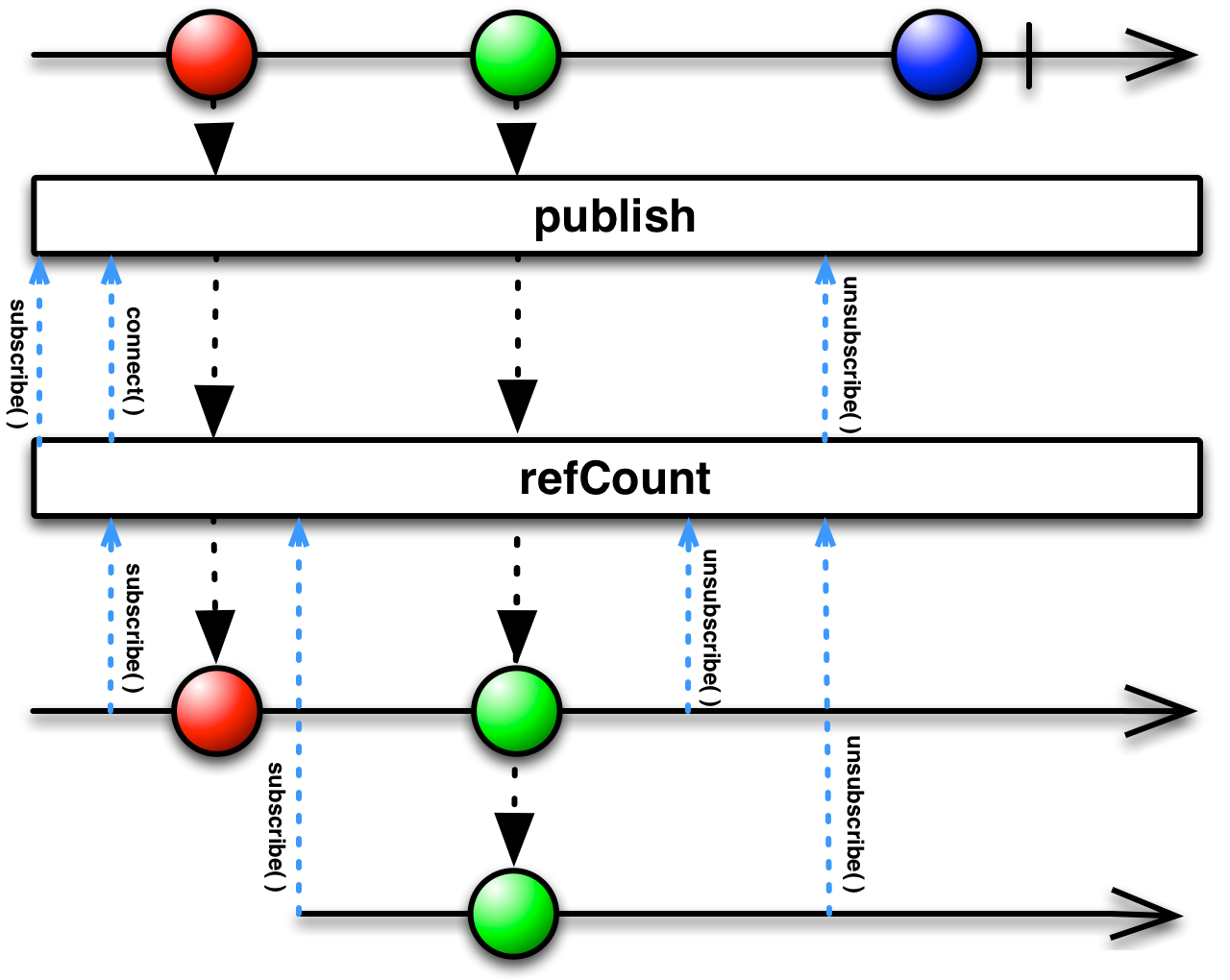
Hystrix 通过 RxJava 的 share 操作符产生一种特殊的 Observable:当有一个订阅者去消费事件流时它就开始产生事件,可以有多个订阅者去订阅,同一时刻收到的事件是一致的;直到最后一个订阅者取消订阅以后,事件流才停止产生事件。其底层实现非常有意思:
|
1 2 3 |
public final Observable<T> share() { return publish().refCount(); } |
在执行 publish 的时候,Observable 会被变换成为一个 ConnectableObservable。这种 ConnectableObservable 只会在进行连接操作(connect)以后才会产生数据(连接后行为类似于 hot observable)。而 share 操作底层的 refCount 操作符就帮我们做了这样的操作:refCount 底层维护着一个引用计数器,代表绑定的订阅者数目。当第一个订阅者去消费事件流的时候,引用计数大于 0,refCount 底层会自动进行 connect,从而触发事件流产生事件;当最后一个订阅者取消订阅以后,引用计数归零,refCount 底层就会自动进行 disconnect,事件流停止产生事件。也就是说,这样的一个可以被多个订阅者共享的事件流,底层是基于引用计数法来管理事件的产生的,和智能指针的思想类似。
事件流聚合为桶
上面我们研究完了事件流是如何产生的,接下来就回归到事件流聚合为桶的逻辑:
|
1 2 3 4 5 6 7 |
this.bucketedStream = Observable.defer(() -> { // defer 的意思是 lazy 创建 return inputEventStream .observe() .window(bucketSizeInMs, TimeUnit.MILLISECONDS) // 按单元窗口长度来将某个时间段内的调用事件聚集起来 .flatMap(reduceBucketToSummary) // 将每个单元窗口内聚集起来的事件集合聚合成桶 .startWith(emptyEventCountsToStart); // 为了保证窗口的完整性,开始的时候先产生一串空的桶 }); |
其中的核心是 window 操作符,它可以按单元窗口长度来将某个时间段内的调用事件聚集起来,此时数据流里每个对象都是一个集合:Observable<Event>,所以需要将其聚集成桶类型以将其扁平化。Hystrix 通过 RxJava 的 reduce 操作符进行“归纳”操作,将一串事件归纳成一个桶:
|
1 |
this.reduceBucketToSummary = eventBucket -> eventBucket.reduce(getEmptyBucketSummary(), appendRawEventToBucket); |
其中我们需要提供桶的初值(即空桶),并要提供聚合函数来进行聚合,类型为 Bucket -> Event -> Bucket(代表对于每个 Event,都将其聚合到 Bucket 中,并返回聚合后的 Bucket)。不同的实现对应的 Bucket 和规约函数不同,比如熔断器依赖的 HealthCountsStream 就以 long[] 来作为每个桶。
注:此处的
window(timespan, unit)操作符属于计算型操作符,默认会在Schedulers.computation()调度器下执行(CPU 密集型),其底层本质是线程数为 CPU 核数的线程池。RxJava 会确保其线程安全。
BucketedRollingCounterStream
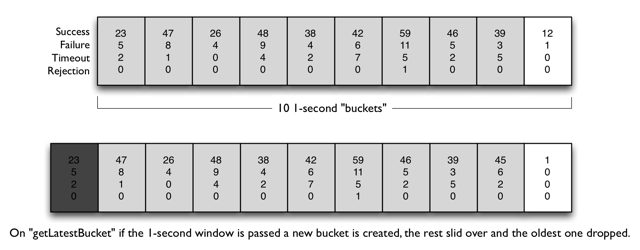
BucketedRollingCounterStream 按照滑动窗口的大小对每个单元窗口产生的桶进行聚合,这也是 Hystrix 1.5 中滑动窗口的抽象实现。其核心实现仍然位于构造函数内:
|
1 2 3 4 5 6 7 8 9 10 11 12 13 14 15 16 17 18 19 20 21 22 23 24 25 26 27 |
public abstract class BucketedRollingCounterStream<Event extends HystrixEvent, Bucket, Output> extends BucketedCounterStream<Event, Bucket, Output> { private Observable<Output> sourceStream; private final AtomicBoolean isSourceCurrentlySubscribed = new AtomicBoolean(false); protected BucketedRollingCounterStream(HystrixEventStream<Event> stream, final int numBuckets, int bucketSizeInMs, final Func2<Bucket, Event, Bucket> appendRawEventToBucket, final Func2<Output, Bucket, Output> reduceBucket) { super(stream, numBuckets, bucketSizeInMs, appendRawEventToBucket); Func1<Observable<Bucket>, Observable<Output>> reduceWindowToSummary = window -> window.scan(getEmptyOutputValue(), reduceBucket).skip(numBuckets); this.sourceStream = bucketedStream // 数据流,每个对象代表单元窗口产生的桶 .window(numBuckets, 1) // 按照滑动窗口桶的个数进行桶的聚集 .flatMap(reduceWindowToSummary) // 将一系列的桶聚集成最后的数据对象 .doOnSubscribe(() -> isSourceCurrentlySubscribed.set(true)) .doOnUnsubscribe(() -> isSourceCurrentlySubscribed.set(false)) .share() // 不同的订阅者看到的数据是一致的 .onBackpressureDrop(); // 流量控制,当消费者消费速度过慢时就丢弃数据,不进行积压 } @Override public Observable<Output> observe() { return sourceStream; } /* package-private */ boolean isSourceCurrentlySubscribed() { return isSourceCurrentlySubscribed.get(); } } |
构造函数后两个参数参数分别代表两个函数:将事件流聚合成桶的函数(appendRawEventToBucket) 以及 将桶聚合成输出对象的函数(reduceBucket)。
我们看到 BucketedRollingCounterStream 实现了 observe 方法,返回了一个 Observable<Output> 类型的发布者 sourceStream,供订阅者去消费。这里的 sourceStream 应该就是滑动窗口的终极形态了,那么它是如何变换得到的呢?这里面的核心还是 window 和 flatMap 算子。这里的 window 算子和之前的版本不同,它可以将数据流中的一定数量的数据聚集成一个集合,它的第二个参数 skip=1 的意思就是按照步长为 1 在数据流中滑动,不断聚集对象,这即为滑动窗口的真正实现。到这里每个窗口都已经形成了,下一步就是要对窗口进行聚合了。注意这里聚合操作没有用 reduce,而是用了 scan + skip(numBuckets) 的组合:
|
1 |
Func1<Observable<Bucket>, Observable<Output>> reduceWindowToSummary = window -> window.scan(getEmptyOutputValue(), reduceBucket).skip(numBuckets); |
这里每个集合的大小都是 numBuckets,看起来用 reduce 和 scan + skip(numBuckets) 没有什么区别,但是注意当数据流终结时,最后面的窗口大小都不满 numBuckets,这时候就需要把这些不完整的窗口给过滤掉来确保数据不缺失。这个地方也是开发的时候容易忽略的地方,很值得思考。
聚合完毕以后,基本的滑动窗口数据就OK了,为了支持多订阅者,还要进行 share;并且利用 onBackpressureDrop 操作符实现流量控制,此处当消费者跟不上的时候就直接丢掉数据,不进行积压。
HealthCountsStream
前面滑动窗口的抽象实现都已经分析完了,现在我们就来看一下其中的一个具体实现 - HealthCountsStream,它提供实时的健康检查数据(HystrixCommandMetrics.HealthCounts,统计调用成功和失败的计数)。
之前我们提到 BucketedRollingCounterStream 里面有三个类型参数和两个重要函数参数。HealthCountsStream 对应的三个类型参数分别为:
Event:HystrixCommandCompletion,代表命令执行完成。可以从中获取执行结果,并从中提取所有产生的事件(HystrixEventType)Bucket: 桶的类型为long[],里面统计了各种事件的个数。其中 index 为事件类型枚举对应的索引(ordinal),值为对应事件的个数Output:HystrixCommandMetrics.HealthCounts,里面统计了总的执行次数、失败次数以及失败百分比,供熔断器使用
滑动窗口里用于将事件聚合成桶的函数实现:
|
1 2 3 4 5 6 7 8 9 10 11 12 |
public static final Func2<long[], HystrixCommandCompletion, long[]> appendEventToBucket = (initialCountArray, execution) -> { ExecutionResult.EventCounts eventCounts = execution.getEventCounts(); for (HystrixEventType eventType: ALL_EVENT_TYPES) { switch (eventType) { case EXCEPTION_THROWN: break; //this is just a sum of other anyway - don't do the work here default: initialCountArray[eventType.ordinal()] += eventCounts.getCount(eventType); break; } } return initialCountArray; }; |
滑动窗口里用于将每个窗口聚合成最终的统计数据的的函数实现:
|
1 2 3 4 5 6 7 8 9 10 11 12 13 14 15 16 17 18 19 |
private static final Func2<HystrixCommandMetrics.HealthCounts, long[], HystrixCommandMetrics.HealthCounts> healthCheckAccumulator = HystrixCommandMetrics.HealthCounts::plus; // 具体的实现,位于 HystrixCommandMetrics.HealthCounts 类内 public HealthCounts plus(long[] eventTypeCounts) { long updatedTotalCount = totalCount; // 之前的请求总数 long updatedErrorCount = errorCount; // 之前的失败个数 long successCount = eventTypeCounts[HystrixEventType.SUCCESS.ordinal()]; long failureCount = eventTypeCounts[HystrixEventType.FAILURE.ordinal()]; long timeoutCount = eventTypeCounts[HystrixEventType.TIMEOUT.ordinal()]; long threadPoolRejectedCount = eventTypeCounts[HystrixEventType.THREAD_POOL_REJECTED.ordinal()]; long semaphoreRejectedCount = eventTypeCounts[HystrixEventType.SEMAPHORE_REJECTED.ordinal()]; // 加上所有事件的总数 updatedTotalCount += (successCount + failureCount + timeoutCount + threadPoolRejectedCount + semaphoreRejectedCount); // 加上失败事件的总数(包括请求失败、超时、线程池满、信号量满) updatedErrorCount += (failureCount + timeoutCount + threadPoolRejectedCount + semaphoreRejectedCount); return new HealthCounts(updatedTotalCount, updatedErrorCount); } |
Hystrix 熔断器里会实时地去消费每个窗口产生的健康统计数据,并根据指标来决定熔断器的状态:
|
1 2 3 4 5 6 7 8 9 10 11 12 13 14 15 16 17 18 19 20 21 22 23 24 25 26 27 28 29 30 31 32 33 34 35 36 37 38 39 40 41 42 43 44 45 46 47 48 49 50 51 52 53 54 55 56 57 58 59 60 61 62 63 64 65 |
/* package */class HystrixCircuitBreakerImpl implements HystrixCircuitBreaker { private final HystrixCommandProperties properties; private final HystrixCommandMetrics metrics; enum Status { CLOSED, OPEN, HALF_OPEN; } private final AtomicReference<Status> status = new AtomicReference<Status>(Status.CLOSED); private final AtomicLong circuitOpened = new AtomicLong(-1); private final AtomicReference<Subscription> activeSubscription = new AtomicReference<Subscription>(null); protected HystrixCircuitBreakerImpl(HystrixCommandKey key, HystrixCommandGroupKey commandGroup, final HystrixCommandProperties properties, HystrixCommandMetrics metrics) { this.properties = properties; this.metrics = metrics; //On a timer, this will set the circuit between OPEN/CLOSED as command executions occur Subscription s = subscribeToStream(); activeSubscription.set(s); } private Subscription subscribeToStream() { /* * This stream will recalculate the OPEN/CLOSED status on every onNext from the health stream */ return metrics.getHealthCountsStream() .observe() .subscribe(new Subscriber<HealthCounts>() { @Override public void onCompleted() { } @Override public void onError(Throwable e) { } @Override public void onNext(HealthCounts hc) { // check if we are past the statisticalWindowVolumeThreshold if (hc.getTotalRequests() < properties.circuitBreakerRequestVolumeThreshold().get()) { // we are not past the minimum volume threshold for the stat window, // so no change to circuit status. // if it was CLOSED, it stays CLOSED // if it was half-open, we need to wait for a successful command execution // if it was open, we need to wait for sleep window to elapse } else { if (hc.getErrorPercentage() < properties.circuitBreakerErrorThresholdPercentage().get()) { //we are not past the minimum error threshold for the stat window, // so no change to circuit status. // if it was CLOSED, it stays CLOSED // if it was half-open, we need to wait for a successful command execution // if it was open, we need to wait for sleep window to elapse } else { // our failure rate is too high, we need to set the state to OPEN if (status.compareAndSet(Status.CLOSED, Status.OPEN)) { circuitOpened.set(System.currentTimeMillis()); } } } } }); } } |
总结
Hystrix 1.5 使用 RxJava 1.x 来实现滑动窗口,将滑动窗口抽象成响应式数据流的形式,既适合 Hystrix 事件驱动的特点,又易于实现和使用。滑动窗口的实现的要点就是每个桶的聚合以及滑动窗口的形成,Hystrix 巧妙地运用了 RxJava 中的 window 操作符来将单位窗口时间内的事件,以及将一个窗口大小内的桶聚集到一起,并通过 reduce 等折叠操作将事件集合聚集为桶,将滑动窗口内的桶聚集成指标数据,非常巧妙。同时,Hystrix 利用 ThreadLocal 作为一个线程安全的“代理”,可以确保多个发布者写的线程安全;通过 RxJava 的 share 操作符可以确保多个订阅者从某个共享的 Observable 中观察的序列一致。
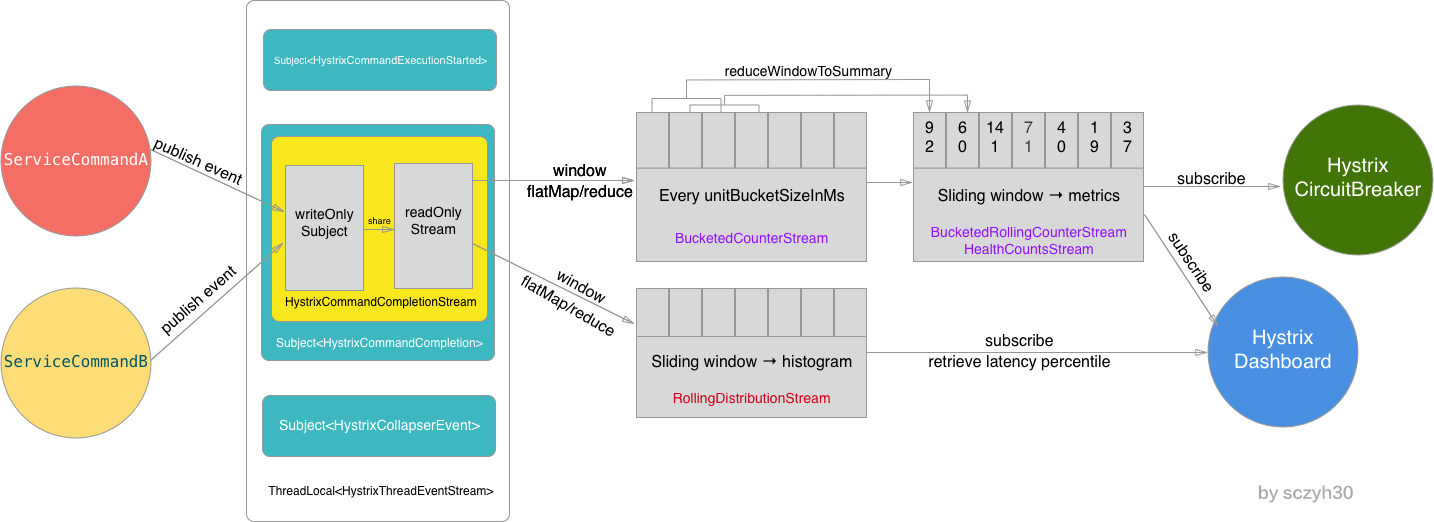
最后用一张图来总结 Hystrix Metrics 事件驱动的流程:
References
文章作者:sczyh30
发布时间:2017年12月04日
原始链接:http://www.sczyh30.com/posts/高可用架构/netflix-hystrix-1-5-sliding-window/
许可协议: "知识共享-保持署名-非商用-相同方式共享 4.0" 转载请保留原文链接及作者。